Cloud Data Integration Setup
Connect Your Cloud Accounts in Minutes
Tailpipe seamlessly integrates with AWS, Azure, and Google Cloud Platform to provide accurate carbon emissions analytics. Our automated setup scripts handle all the technical complexity, creating secure, read-only access to your cloud cost and utilization data.
Why Use Tailpipe?
- Automated Setup - One command deploys all required infrastructure
- Security First - Read-only access with least-privilege permissions
- Open Source Scripts - Full transparency so you can review every line of code
- No Agents Required - Native cloud integrations with no software to install
- Multi-Account Support - Works with AWS Organizations, Azure Management Groups, and GCP billing accounts
Get Started
Choose your cloud provider below to begin setup.
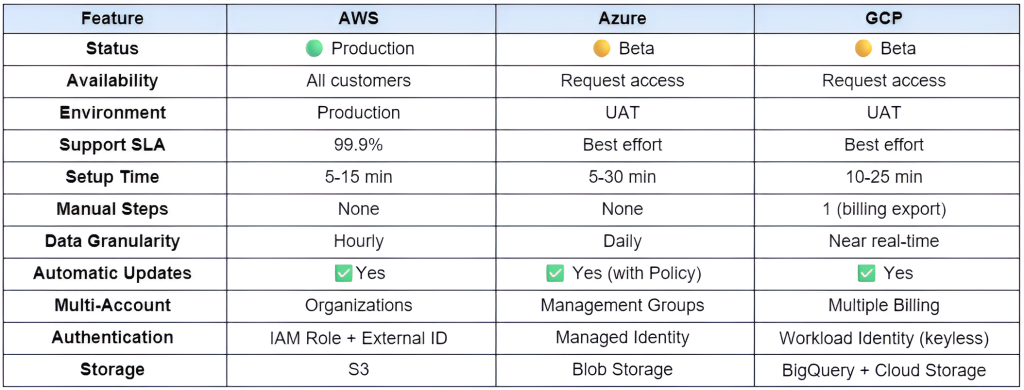
Cloud Integration Comparison
Choose the right setup method for your organization.
Frequently Asked Questions
General Questions
You only need the cloud provider’s CLI tool (AWS CLI, Azure CLI, or gcloud) and our setup scripts. No agents or continuous software installations are required.
No. All integrations use read-only permissions. Tailpipe can only read cost and billing data, never modify infrastructure.
Usually 24-48 hours. Cloud providers need time to generate the first cost export. Once data starts flowing, it updates daily (Azure), hourly (AWS), or near real-time (GCP).
Yes. Tailpipe provides a cleanup script that safely removes all resources created during setup for each cloud provider. The process takes 2-5 minutes.
Completely reversible. Our cleanup scripts remove all infrastructure we created. Your existing cloud resources are never modified.
Our scripts fully support multi-account scenarios. AWS uses Organizations, Azure uses Management Groups or multiple subscriptions, and GCP supports multiple billing accounts in a single project.
Security Questions
Tailpipe requires read-only access to:
AWS: S3 bucket (Cost and Usage Reports) and CloudWatch metrics.
Azure: Storage account (cost exports) and optionally Cost Management API.
GCP: BigQuery dataset (billing export) and Cloud Storage bucket.
All data transfer uses encrypted connections (TLS 1.2+). Data at rest is encrypted using cloud provider default encryption. Access is logged and auditable. Tailpipe uses least-privilege permissions.
No. We never store cloud credentials. Integrations use:
AWS: IAM role assumption with External ID
Azure: Managed Identity (keyless)
GCP: Workload Identity Federation (keyless)
Our setup scripts create audit-compliant integrations. See our Security Documentation for detailed compliance information.
Technical Questions
Yes. All scripts support environment variables for customization. You can also modify the scripts directly – they’re open source.
Enable debug mode (DEBUG=1 ./setup-tailpipe.sh) and consult our Troubleshooting Guide. Our support team is also available.
Contact our support team for government cloud requirements. Special configuration may be needed.
Currently, we provide bash scripts for maximum compatibility. Terraform modules are on our roadmap. Contact us if you need IaC templates.
Pull the latest scripts from our GitHub repository and re-run the setup script. The script is idempotent and safely updates existing resources.
Support
Need Help with Your Cloud Integration?
Our team is here to assist with any questions or issues during setup.
Contact us via email here: [email protected]
Before Contacting Support
- 1. Review the documentation for your cloud provider (links above)
- 2. Check the troubleshooting guide at docs/troubleshooting.md
- 3. Enable debug mode and review the output: bash DEBUG=1 ./setup-tailpipe.sh 2>&1 | tee setup-debug.log
Response Times
- Business hours (Mon-Fri, 9am-5pm GMT): Within 4 hours
- After hours: Within 24 hours
- Critical issues: Immediate escalation
What to Include
When contacting support, please provide:
- Cloud provider (AWS/Azure/GCP)
- Script version (shown at start of script output)
- Error messages (exact text)
- Debug log (if available)
- Your Tailpipe account email
Redact sensitive information before sharing:
- Account numbers
- Subscription IDs
- External IDs
- Service account keys
Additional Resources
Architecture Guide – How it all works
Security Best Practices – Security guidance
GitHub Repository – All scripts and documentation
Ready to Get Started?
Connect your cloud accounts to Tailpipe and start tracking carbon emissions today: Get Started with AWS | Get Started with Azure | Get Started with GCP
Questions? Contact our team at [email protected]
